
Commands and keys
Everything you can type into the task box, and every key the dashboard listens for.
What you type
| input | result |
|---|---|
| plain text | One isolated agent in its own workspace. The default, and the only thing that cannot touch your checkout. |
| /plan <goal> | An orchestrator that plans a task graph, then runs and merges it. Several can run at once, each in its own pane. |
| /gam <task> | A Generative Adversarial Model pair: a generator that writes, and a read-only adversarial reviewer that argues with it. See GAM. |
| /main <task> | An agent in your real checkout. Nothing to merge. /m is the same thing. |
Commands
| command | what it does |
|---|---|
| /model | Set the backend, model and reasoning effort for the next agent. Effort runs low, medium, high, xhigh, max; xhigh is the default where a model offers it, and opencode takes none. A running agent keeps what it launched with. |
| /fast | Toggle faster output on supported models. |
| /gam | Start a Generative Adversarial Model (GAM) pair: a generator plus an adversarial reviewer. The reviewer defaults to the other provider; name one with /gam codex gpt-5.5 <task>, or add main to run the pair in your checkout. |
| /resume | Continue an existing Claude, Codex or opencode chat as an agent. The picker lists this repo's recent chats and says which directory each one ran in. It lands in an isolated workspace like plain text does; add --here to continue it in your real checkout instead. |
| /restore | Reopen a specific session id in a new pane. |
| /share | Durable local context every agent reads. For tokens, URLs, env details. |
| /goal | Set or change the session's overall goal. |
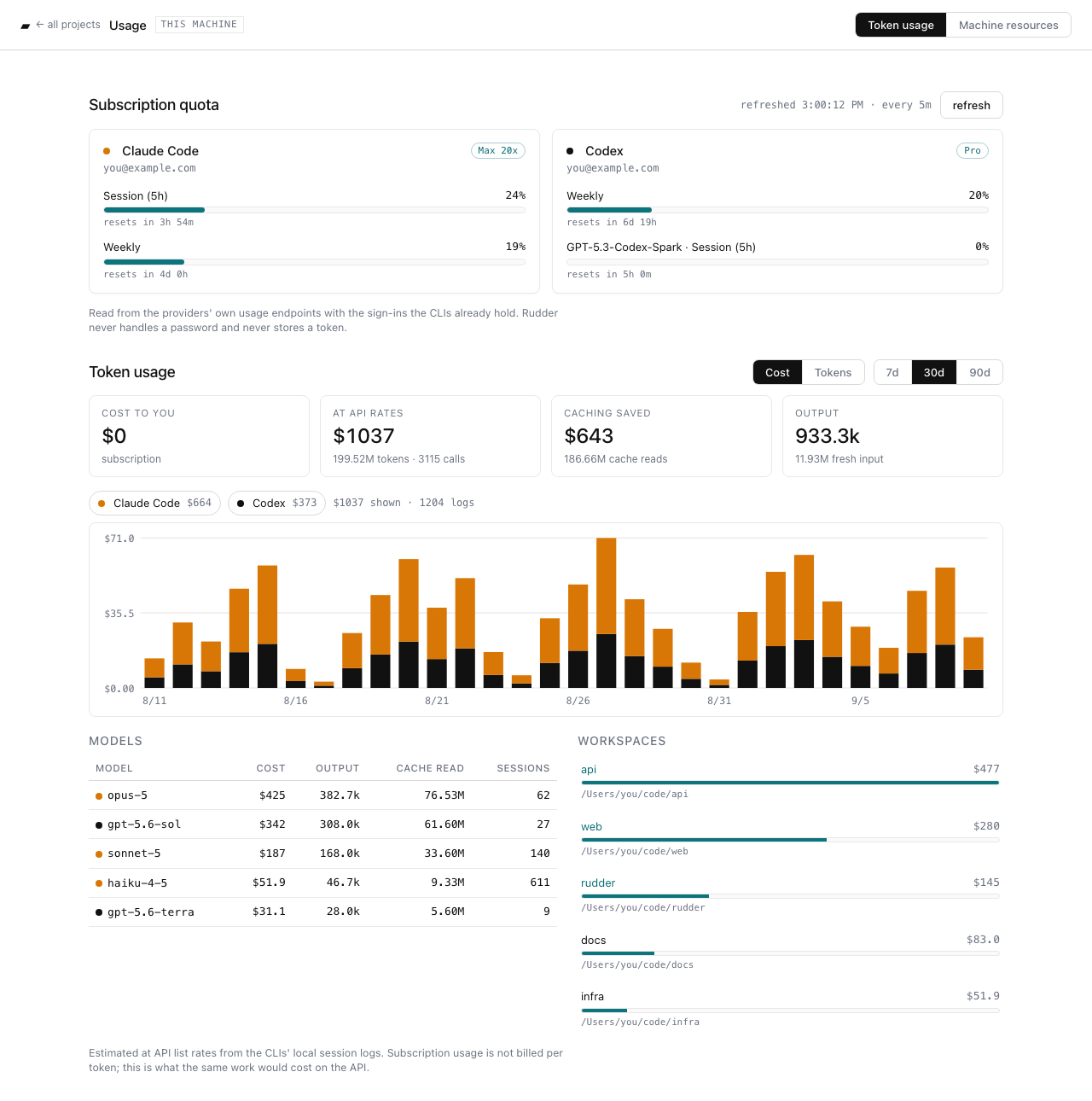
| /usage | Token and cost usage for this session. /usage web (or U) opens the usage dashboard in the browser. |
| /diff | Toggle the diff panel beside the worker (same as Option-d). |
| /cloud | Move the fleet onto Rudder Cloud. |
| /web | Open the web board for this project. |
| /feedback | Send a report, with the local copy written first. |
| /sound, /color | Notification sound and colour preferences. |
Usage dashboard
Press U (or type /usage web) for a page in your browser that
tracks what your agents consume on this machine: subscription quota for every
signed-in Claude Code and Codex account, read from the providers' own usage
endpoints with the sign-ins the CLIs already hold; token costs estimated at API
list rates from the CLIs' local session logs, per day, provider, model and
workspace, with the top sessions per workspace and a click-to-copy id for
--resume; and a live view of CPU and memory for Rudder and every
agent process. Subscription usage is not billed per token, so the page shows
cost to you: $0 and what the same work would have cost on the API.
Keys
| key | action |
|---|---|
| j / k | Move down and up the agents list. |
| Enter | Focus the selected agent's pane. |
| Option-[ / Option-] | Step to the previous or next agent from any pane. |
| Option-h | Full-screen the focused pane; press again to bring the others back. |
| Option-d | Open or close the diff panel: the selected agent's change set parsed into files and hunks, with line numbers, per-file counts, and the run's tokens and cost in the header. j/k scroll, n/p jump between files, r refreshes, Esc closes. |
| Option-4 | Focus the diff panel, opening it if needed. Option-4 then Option-h gives the diff the whole screen. See it. |
| U | Open the usage dashboard in the browser. |
| Option-j / Option-k | Scroll the worker's scrollback a line; Option-u / Option-n half a page. |
| m | Merge the selected agent. |
| M | Merge everything ready. |
| u | Undo a merge. |
| R | Review all. |
| x | Stop the selected agent. |
| b | Branch a new chat from this agent's session. |
| g | Nest work under the selected node. |
| o | Open the web board. |
| P | Model picker for the selected row. |
| dd | Delete the selected agent. |
| cc | Clear merged rows. |
Panes
Option-1, Option-2, Option-3 and Option-4 always mean Agents, Worker, Task and the diff panel. The diff panel is the one pane that is closed by default: Option-4 opens it beside the worker and focuses it, Option-d toggles it, and on a narrow terminal it takes the worker's place instead of squeezing both.
Option-h gives the focused pane the whole screen: no sidebar, no task line, no gutters. Press it again to bring them back. Reaching for it from the task line hands the screen to the worker, since the task input is no longer drawn, and you land back on the task line when the panes return.
The worker pane belongs to the agent, so its keystrokes go to Claude or Codex, not to Rudder. To send a dashboard key from inside it, use the Ctrl-W leader: Ctrl-W v opens the diff panel, Ctrl-W m merges, Ctrl-W 1/2/3/4 switches panes.